 Skip to content
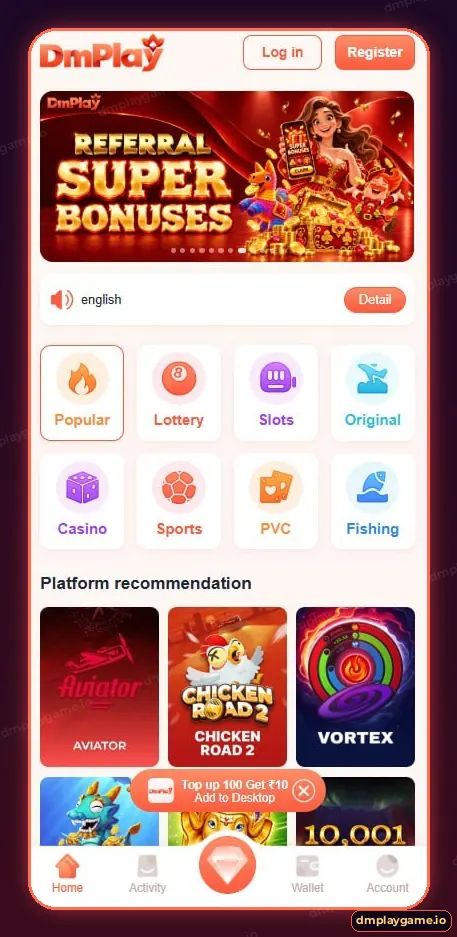
The DmPlayGame app is the mobile version of DmPlay: the same eight-category lobby, UPI wallet and Activity rewards in a full-screen app. Android users install it as an APK from the DmPlay site; iPhone users add the web app to the home screen with Add to Desktop.
What can you do in the DmPlay app?
Centre button
Featured promotions and quick actions.
Which phones support the DmPlay app?
| Device | How to get it | Notes |
|---|---|---|
| Android 7+ | Download the APK | Allow “install unknown apps” for your browser |
| iPhone / iPad | Safari → Share → Add to Home Screen | Runs as a full-screen web app |
| Desktop | Open the web version | Same account and wallet |
How do I set up the app after installing?
- Open DmPlay from your home screen.
- Log in or tap Register to create an account.
- Allow notifications if you want result and event alerts.
- Add a withdrawal account under Wallet.
- Pin your favourite games from the Popular row.
How do I keep the DmPlay app fast?
- Install updates when the app prompts you.
- Clear the app cache if games load slowly.
- Close other heavy apps during live tables.
- Use 4G/5G or stable Wi-Fi for live casino and sports.
Is the DmPlay app safe to install?
Download it only from the DmPlay site you reached through a verified link. Never install “mod” or “hack” versions from Telegram — they are built to steal accounts. Full instructions are in the DmPlay APK download guide, and the Add to Desktop guide covers iPhone.
Who should use the app?
Players who visit DmPlay regularly will find the app faster than a browser tab. Occasional players can stay on the web version. Either way, every guide is linked from the DmPlay app home page.
Key takeaways
- Android: APK. iPhone: Add to Desktop.
- Five bottom tabs: Home, Activity, centre, Wallet, Account.
- Install only from a verified DmPlay site.
- Update when prompted.
Frequently asked questions
Is the DmPlayGame app free?
Yes. Downloading and installing the app is free.
Is DmPlay on the Google Play Store?
No. Android users install the APK from the DmPlay site.
Does the app work on iPhone?
Yes, via Safari’s Add to Home Screen, which DmPlay calls Add to Desktop.
Will my account work in the app and on the web?
Yes. It is the same account and wallet.
Why does the app ask to install unknown apps?
Android asks this for any APK outside the Play Store. Allow it only for your browser.
How do I update the app?
Accept the in-app update prompt or download the latest APK from the DmPlay site.
