 Skip to content
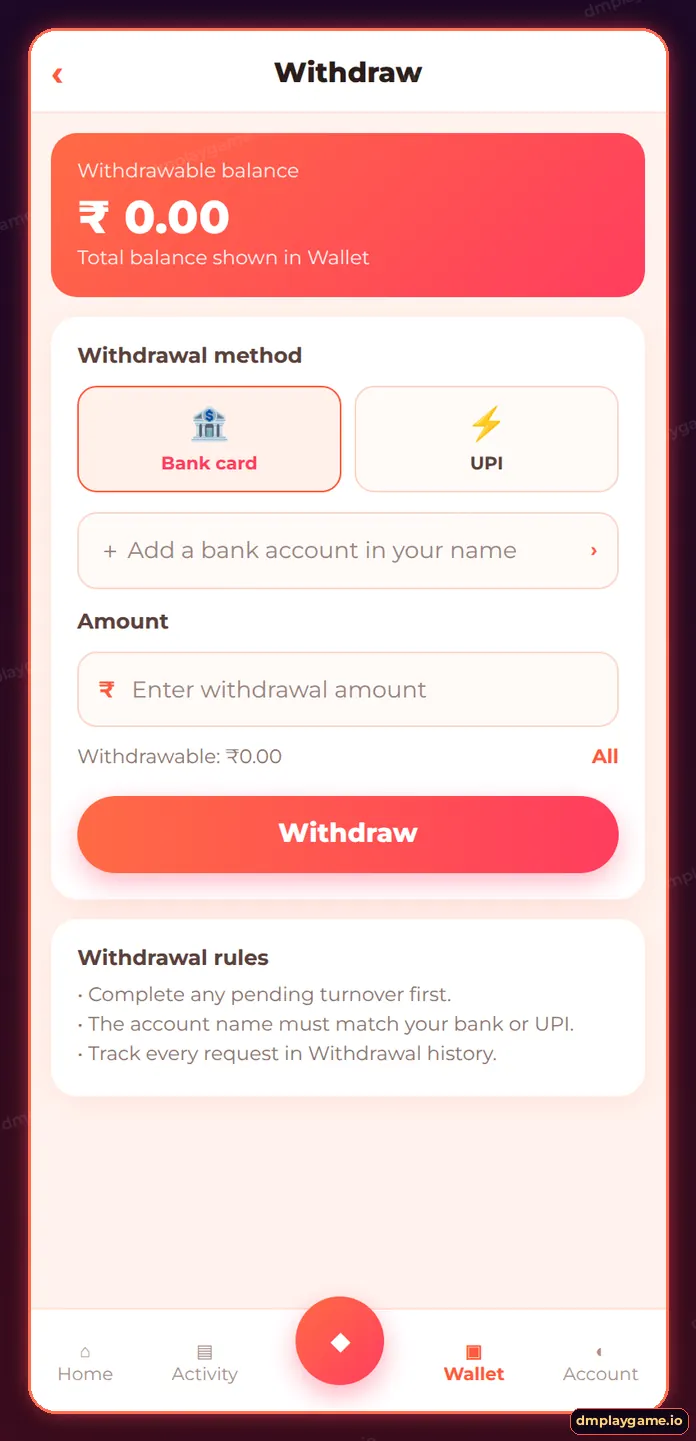
For a DmPlay game withdrawal, open Wallet → Withdraw, select your saved bank account or UPI ID, enter an amount within the limits, type your withdrawal password and submit. The request shows in Withdrawal history; most are processed the same day, after any remaining turnover (betting requirement) is complete.
What do I need before withdrawing?
- A bank account or UPI ID in your own name — see add bank account.
- A withdrawal (fund) password set under Account → Security.
- Completed turnover: the “amount of code still needed” on the Withdraw screen must be zero.
- A balance above the minimum shown on the Withdraw screen.
How do I withdraw from DmPlay step by step?
- Tap Wallet → Withdraw.
- Choose Bank card or UPI and select your saved account.
- Check “Withdrawable balance” and the turnover line.
- Enter the amount.
- Enter your withdrawal password.
- Tap Withdraw and note the order number.
- Track it under Withdrawal history.
What is the DmPlay turnover requirement?
Turnover means the total amount you need to bet before deposited or bonus money can be withdrawn. For example, if a deposit carries 1× turnover, a ₹500 deposit needs ₹500 of bets. Bonuses often carry higher multiples. The Withdraw screen shows how much is still needed.
How long does a DmPlay withdrawal take?
| Status | Meaning | What to do |
|---|---|---|
| Pending / Reviewing | Request received | Wait; do not submit duplicates |
| Processing | Payout sent to the bank | Allow bank processing time |
| Completed | Paid | Check your bank or UPI app |
| Rejected / Returned | Details or rules issue | Balance returns; read the reason |
Many payouts land within hours. If a request stays pending beyond 24 hours, use DmPlay withdrawal problems.
What are DmPlay withdrawal limits?
Limits per request and per day are printed on the Withdraw screen. Third-party sites have quoted a ₹100 minimum, but treat the live screen as final. VIP levels may raise daily limits — see DmPlay VIP.
How do I withdraw safely?
Never share your withdrawal password. Ignore anyone offering to “speed up” a payout for a fee. All cash-out guides start from the DmPlay withdrawal home page.
Key takeaways
- Add a bank or UPI in your own name first.
- Turnover must reach zero before withdrawing.
- Track requests in Withdrawal history.
- Limits are shown on the Withdraw screen.
Frequently asked questions
What is the minimum withdrawal on DmPlay?
It is shown on the Withdraw screen. Some sources quote ₹100, but the in-app value is final.
Why can't I withdraw my balance?
Usually turnover is not complete, no account is linked, or the amount is below the minimum.
Can I withdraw to UPI?
Yes, if a UPI ID in your name is saved under Withdraw.
How many withdrawals can I make per day?
The daily count and amount limits are shown on the Withdraw screen and may rise with VIP level.
Can I cancel a withdrawal?
Pending requests usually cannot be cancelled by the player; contact support if needed.
Is there a withdrawal fee?
Any fee is shown before you confirm. Check the summary line.
