 Skip to content
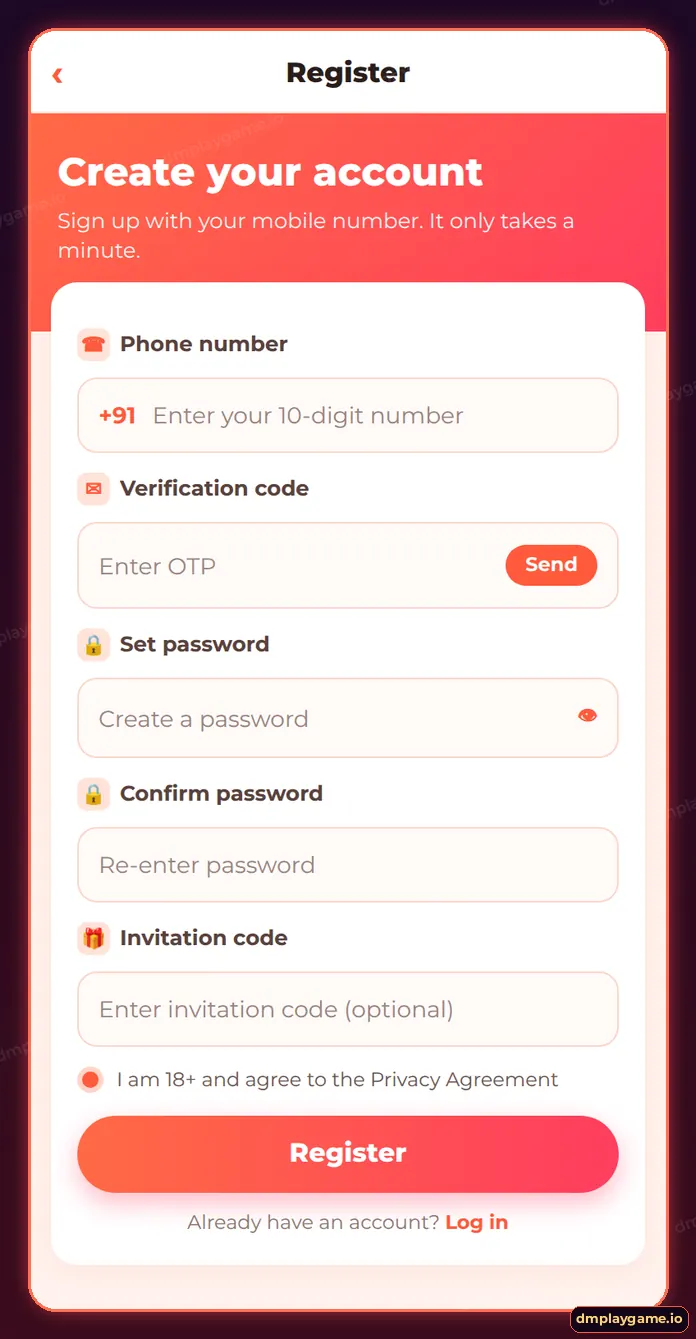
To complete DmPlay game register, tap Register, enter your 10-digit Indian mobile number, tap Send and type the SMS OTP, set and confirm a password, paste an invitation code if you have one, tick the 18+ agreement and tap Register. You are logged in straight away and land on the DmPlay home lobby.
What do you need before registering on DmPlay?
Only three things: a mobile number in your name that receives SMS, a new password, and — if someone invited you — their invitation code. Registration is free and you must be at least 18.
- An active Indian SIM (+91) — it becomes your login ID.
- A password of 8+ characters you do not use anywhere else.
- The invitation code from your referrer (optional, sign-up only).
- A stable connection so the OTP does not expire.
How do I register on DmPlay step by step?
- Open DmPlay from the app or a verified link and tap Register (top right).
- Enter your 10-digit mobile number next to +91.
- Tap Send beside the verification code box and type the OTP from the SMS.
- Create a password, then type it again in Confirm password.
- Check the Invitation code box — it is pre-filled when you use a referral link.
- Tick “I am 18+ and agree to the Privacy Agreement”.
- Tap Register. Your account opens on the home lobby.
Next time, sign in through the DmPlay game login screen with the same number and password.
Which fields are on the DmPlay sign-up form?
| Field | What to enter | Why it matters |
|---|---|---|
| Phone number | 10-digit mobile, +91 preset | Your login ID and recovery route |
| Verification code | SMS OTP | Proves the number is yours |
| Set password | A new, strong password | Protects your wallet |
| Confirm password | Same password again | Prevents typos |
| Invitation code | Referrer’s code (optional) | Links you to the person who invited you |
| Agreement tick | 18+ and privacy consent | Required to create the account |
What if DmPlay registration fails?
Most failures come from an already-registered number, an expired OTP or a password that breaks the rules.
- “Phone number already registered” — use forgot password instead of a new account.
- No OTP — wait 60 seconds, check DND settings and signal; see OTP not received.
- Invalid invitation code — copy it again without spaces.
- Page reloads — clear browser cache or switch Wi-Fi to mobile data.
The full list of fixes is on DmPlay registration problems.
Should I add an invitation code?
If a friend or agent shared DmPlay with you, yes. The code links your account to theirs in the referral system and may qualify you for new-member events. It cannot be added later. Details: DmPlay invitation code.
What should I do after registering?
- Open Account and note your user ID.
- Add a withdrawal account — add bank account.
- Install the app or pin it — DmPlay app download.
- Read the deposit rules — deposit guide.
- Set your own daily spending limit.
Then explore the lobby from the DmPlay game start page.
Who can register on DmPlay?
Adults aged 18+ in India with their own mobile number, living where real-money online games are allowed. One person may hold one account.
Key takeaways
- Sign-up needs a mobile number, OTP and password.
- Add the invitation code during registration — not later.
- One person, one account.
- Registration is always free.
Frequently asked questions
Is DmPlay registration free?
Yes. Creating an account costs nothing.
Can I register without an invitation code?
Yes. The field is optional.
Can I register with email?
DmPlay sign-up is built around an Indian mobile number with OTP verification.
How long does registration take?
About two minutes, most of it waiting for the OTP.
Can I have two DmPlay accounts?
No. Duplicate accounts can be frozen. Recover your existing account instead.
What is the minimum age?
You must be 18 or older.
Do I need KYC to register?
No documents are needed to sign up. Extra checks may be requested later for withdrawals.
